
Download Clear inputs – Firefox add-on, text field clear, utility tool, productivity
Overview
Clear inputs is a minimalistic Firefox add-on designed to streamline the process of clearing text fields within web forms and input areas. Its primary purpose is to eliminate the need for manual selection when deleting content, offering users a faster, more efficient alternative through a simple right-click action. This tool directly addresses a common friction point in daily browsing: the repetitive task of highlighting and erasing text in input fields. By automating this process, Clear inputs enhances user productivity, particularly for individuals who frequently fill out forms, search queries, or login details across multiple websites.
The app is tailored for Mozilla Firefox users who value speed, simplicity, and lightweight extensions. It is especially beneficial for power users, researchers, or anyone engaged in data entry tasks where time efficiency is critical. While the developer did not provide additional background information, the add-on has been available since 2011, indicating long-term stability and consistent functionality. Its enduring presence in the Firefox ecosystem speaks to its reliability and user-centric design.
Real-world use cases include clearing search bars after each query, resetting login fields between sessions, or preparing form fields for new entries without distraction. In the broader context of browser utilities, Clear inputs occupies a niche as a focused tool that delivers a single, high-impact function without bloat. It exemplifies the principle of “less is more” in software design, proving that small, well-executed utilities can significantly improve workflow efficiency.
Key Features & Functionality
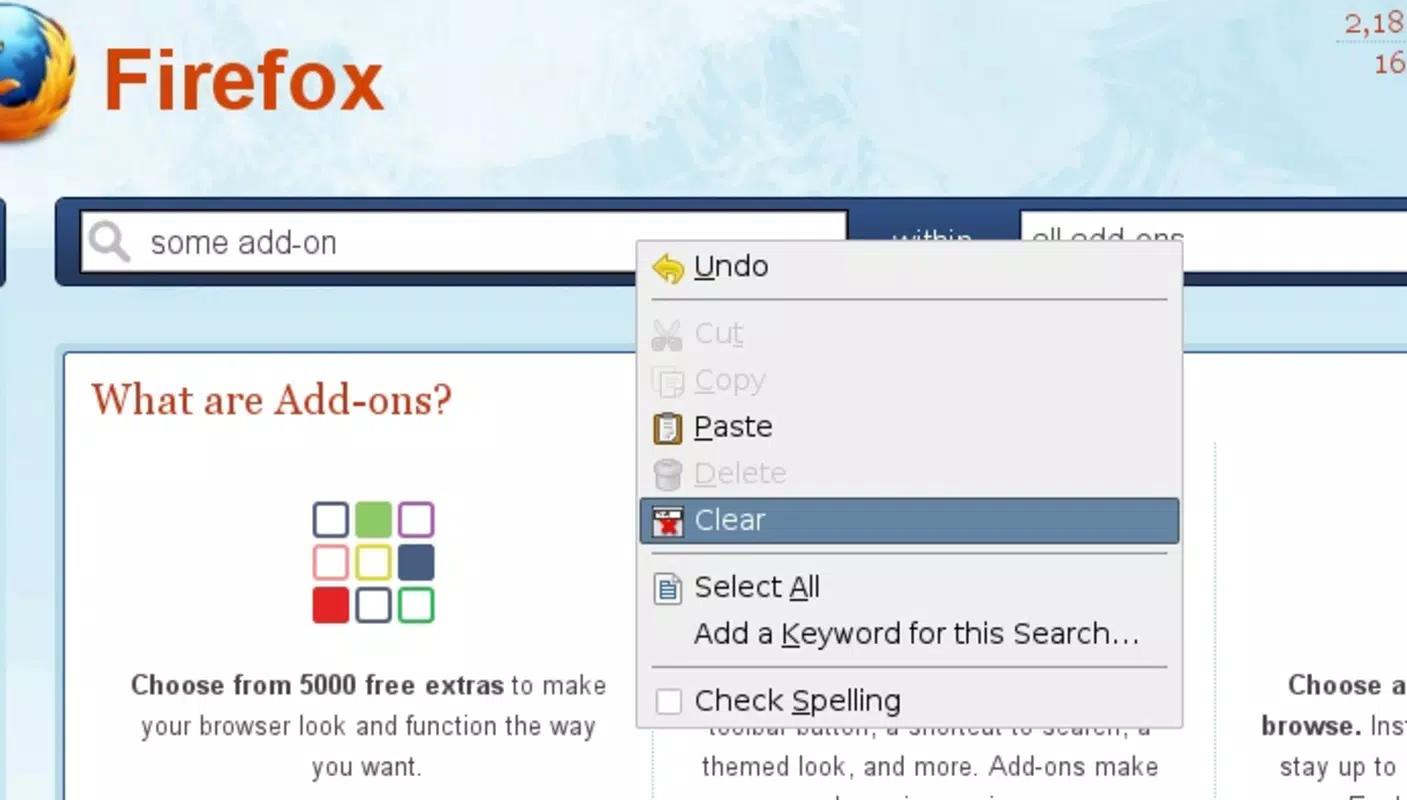
- Right-Click Text Clearing: The core functionality allows users to clear all text in any input field with a single right-click. No selection or cursor positioning is required, reducing steps and minimizing user fatigue during repetitive tasks.
- Context Menu Integration: The add-on seamlessly embeds into Firefox’s standard context menu, ensuring consistent access across all web pages and input types, including text areas, search boxes, and form fields.
- Minimalist Design Philosophy: Clear inputs avoids feature creep by focusing exclusively on one function. This ensures a clean, distraction-free experience and reduces the risk of conflicts with other extensions.
- Effortless Workflow Enhancement: By eliminating the need to manually highlight text, the tool accelerates common actions, particularly useful in scenarios involving frequent form resets or rapid search iterations.
- Low Resource Consumption: The add-on is lightweight and does not significantly affect browser performance, ensuring smooth operation even when multiple extensions are active.
For example, a user conducting research across multiple search engines can clear each query field instantly without navigating through the text. Similarly, a customer service agent handling multiple login attempts can reset credentials quickly, improving task turnaround time. These real-world applications highlight the practical value of a tool that prioritizes efficiency over complexity.
Interface, UX & Performance
Clear inputs maintains a minimalist interface, relying entirely on Firefox’s built-in context menu for user interaction. There are no additional panels, settings, or visual elements to manage, which contributes to its unobtrusive nature. The visual style aligns with Firefox’s standard UI, ensuring consistency and familiarity for users. Navigation is intuitive: a right-click on any text input field triggers the “Clear” option, which immediately removes all content.
Although the developer did not list formal performance metrics, the add-on’s lightweight architecture suggests consistent responsiveness across a range of devices, including older or lower-end systems. Users can expect minimal lag or delay when invoking the clear function, preserving the fluidity of browsing. Stability appears robust, given the add-on’s long-standing presence since 2011. It has not been reported to cause crashes or conflicts with core browser functions.
Users engaging in high-frequency input clearing tasks may notice a cumulative improvement in workflow efficiency. The lack of configuration options ensures that the experience remains predictable and accessible to all skill levels. Overall, the UX is optimized for speed and simplicity, making it ideal for users who prioritize function over customization.
Platform Compatibility & Technical Requirements
Clear inputs is designed exclusively for Mozilla Firefox, ensuring compatibility with the browser’s extension ecosystem. The add-on is available for both desktop and mobile versions of Firefox, though specific platform details were not provided. The file size is minimal, reflecting its lightweight nature, though exact dimensions were not disclosed.
Compatibility with specific Firefox versions was not specified. The developer did not list formal minimum OS requirements or hardware specifications. However, given its long-standing operation since 2011, it is likely compatible with current and recent Firefox releases. Users should ensure their Firefox installation is up to date to maintain optimal performance and security.
Although the developer did not specify minimum OS requirements, the add-on is expected to function on modern Windows, macOS, and Linux systems that support Firefox. For mobile users, compatibility with Android and iOS versions of Firefox is probable, though confirmation depends on the latest extension policies.
Pros and Cons
- Simple, focused functionality that delivers immediate value
- Seamless integration with Firefox’s context menu
- Lightweight with no noticeable impact on browser performance
- Consistent across all websites and input types
- Free to use with no ads or in-app purchases
- No user settings or customization options
- Not available outside the Firefox ecosystem
- Functionality limited to text field clearing only
- Developer did not provide detailed technical documentation
- Updates may be infrequent due to minimal feature development
FAQ
Is Clear inputs safe to install?
Yes, Clear inputs is a trusted Firefox add-on with a long history of stable operation. It does not collect user data or display advertisements. As with any extension, it’s recommended to install only from official sources such as the Firefox Add-ons website.
Can I use Clear inputs on mobile browsers?
While the add-on is compatible with Firefox on Android and iOS, specific functionality may vary based on mobile browser limitations. The right-click menu is not available on touch devices, which may affect access to the clear feature.
Does Clear inputs work on all websites?
Yes, the add-on functions on all websites where text input fields are present, including search engines, login forms, and web applications. It operates at the browser level, ensuring broad compatibility.
How do I update Clear inputs?
Updates are automatically managed through the Firefox Add-ons manager. Users should ensure that automatic updates are enabled in Firefox settings to receive the latest version.
Is Clear inputs free to use?
Yes, Clear inputs is completely free. It does not require payment, subscriptions, or in-app purchases. The developer has not implemented any monetization features.
Final Thoughts
Clear inputs stands out as a rare example of a tool that achieves maximum impact with minimal effort. Its singular focus on clearing text fields via right-click delivers tangible time savings and enhances daily browsing efficiency. For Firefox users who perform repetitive input tasks, this add-on is a reliable, no-frills utility that fits seamlessly into their workflow. It exemplifies the power of simplicity in software design—offering a powerful function without complexity.
While it lacks advanced features or customization, its strength lies in consistency, reliability, and performance. It’s ideal for users who value speed and stability over configurability. In a digital landscape often crowded with bloated applications, Clear inputs remains a refreshing reminder that sometimes, the best tools are the ones that do one thing exceptionally well.
Download Clear inputs now


